Staring at a blank page is a terrible way to start a job search. It is frustrating and a waste of time. A free resume builder with templates changes the process. It gives you a professional, structured layout from the start. This lets you focus on your skills and experience. You do not have to worry about margins and fonts.
Why A Resume Builder Is Your Best First Step
Building a resume from scratch can be a headache. You have to pick the right format and a clean font. Then you must get everything to line up perfectly. A builder tool is your secret weapon. It handles the design work for you. You can focus your energy on writing content that gets a hiring manager's attention.
These tools are built around what recruiters want. Every template is designed to highlight your career story. This includes your work history, skills, and biggest wins. You fill in your details. The builder makes sure the final resume is polished and easy to scan.
Overcoming The Blank Page Problem
The biggest hurdle for job seekers is just getting started. A good resume builder removes that barrier. You see a simple, guided process instead of an empty screen.
- Structured Sections: The builder prompts you for everything. This includes contact info, a professional summary, and your work history. It makes sure you do not forget any key parts.
- Professional Designs: You get access to a library of templates. They have been tested and work well in different industries.
- Time Efficiency: What could take hours by hand can be done in minutes. This means you can get back to applying for jobs much faster.
This guided experience is why many people switch to builders. A study of over 500,000 job seekers found that 88% chose to create new resumes with a builder. They did not try to fix their old ones. You can discover more insights from this resume statistics report. The trend is clear: smart job seekers start fresh with tools built for success.
Let's quickly summarize the clear advantages.
Instant Benefits Of Using A Resume Builder
Here is a quick look at the key advantages of using a professional resume builder.
| Feature | Benefit For Your Job Search |
|---|---|
| Professional Templates | Your resume looks polished and modern. It makes a great first impression. |
| Guided Structure | You'll never miss a crucial section. This ensures your resume is complete. |
| ATS-Friendly Formatting | Increases the chance your resume will pass automated screening systems. |
| Time Savings | Create a high-quality resume in minutes, not hours. You can apply to more jobs. |
| Easy Customization | Quickly tailor your resume for different jobs without starting from scratch. |
A builder gives you a powerful head start without the usual hassle.
Focus On What Truly Matters
When a tool handles the layout, you can focus on the words on the page. This is your chance to sell your skills and accomplishments. You can spend time perfecting your bullet points to show real, measurable results. You will not be fiddling with line spacing.
A great resume is more than a list of jobs. It is a marketing document for your career. A builder provides the professional canvas you need to paint a compelling picture for employers.
Using a free resume builder with templates is about working smarter, not harder. It gives you confidence that your resume looks great and is well-organized. You can explore a variety of professional templates and start building a resume that opens doors. This step lays the foundation for a successful job search. It helps you put your best foot forward from the first application.
Choosing The Perfect Template For Your Career Path
Your resume's design is the first thing a hiring manager sees. It sets the tone for your application before they read a single word. Picking the right layout from a free resume builder with templates is a strategic move. The goal is to match the template to your industry, role, and career level.
A creative director will not use the same resume as a financial analyst. The creative director might choose a template with color or a unique layout. This shows their design sense. The analyst needs something clean, modern, and professional.
This decision is your first critical step. It sets you on the right path.
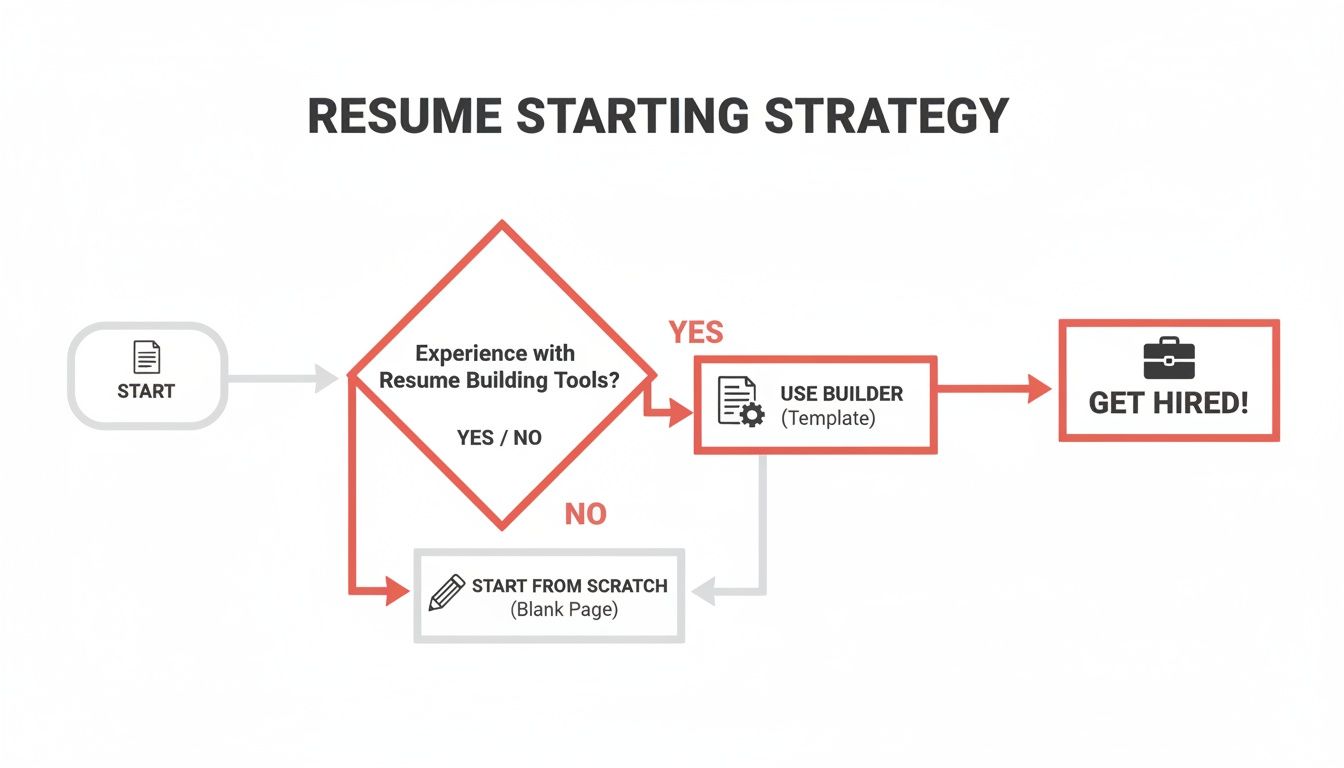
As you can see, using a builder with templates is a direct route to a professional document.
Aligning Template Style With Your Industry
The template you choose should signal that you understand the culture of your industry. A mismatched design can be a red flag. It suggests you have not done your homework.
Here are some common styles and where they fit best:
- Minimalist & Modern: These templates have clean lines and lots of white space. They are perfect for technical fields like software engineering, finance, law, and healthcare. Clarity is key in these fields.
- Creative & Bold: These templates use smart colors or unique fonts. They are for roles in marketing, graphic design, media, or fashion. They let you show some personality.
- Professional & Traditional: These are classic designs that are always in style. They are a safe choice for corporate jobs, administration, and government positions. They project reliability.
A study of recruiter behavior found that a resume's visual appeal affects their first impression. A well-chosen template can make your resume 50% more likely to get a full read-through.
Choosing a template that lines up with industry norms helps you fit in. Your qualifications can then be what makes you stand out.
Selecting a Template Based On Your Experience Level
Your career stage is also important. A recent graduate and a senior executive have different stories to tell. Their resumes need to reflect that. A good template guides the recruiter’s eye to your most important qualifications.
Consider these scenarios:
- For recent graduates: You need a template that highlights your Education section. It should be right after your summary. Templates with a Projects section are also great for showing academic work.
- For mid-career professionals: A two-column layout is often a great choice. This design lets you feature a strong Skills section next to your Work Experience.
- For senior executives: The resume should be about leadership and accomplishments. Choose a single-column template. This gives you room for a detailed history of your most impactful roles.
The best free resume builder with templates gives you many options. You can find professional resume templates for every career stage and industry. When you make a thoughtful choice, you ensure your resume’s design strengthens your message.
Crafting Content That Captures A Recruiter's Attention
A great template gives your resume a professional look. The words you choose are what get you the interview. Once you pick a layout using a free resume builder with templates, you must fill it with content that proves your value. This starts with a powerful professional summary.
Think of this short paragraph at the top of your resume as your elevator pitch. It needs to quickly answer one question: "Why are you the right person for this job?" Do not use generic objectives. Focus on your key skills, years of experience, and a major accomplishment. Make sure it lines up with the role you want.
Write Bullet Points That Show Results
Hiring managers need to know how well you did your job. Stop listing simple job duties. Switch to achievement-based bullet points that prove your impact. The simplest way to do this is to use numbers.
Look at how to transform a basic responsibility into a powerful result:
Instead of: "Managed the company's social media accounts."
Try this: "Grew social media engagement by 40% in six months by launching a new content strategy."
Instead of: "Responsible for training new team members."
Try this: "Developed and implemented a new training program that reduced new hire onboarding time by 25%."
Numbers provide clear evidence of your skills. They show you are a results-oriented candidate.
Tailor Your Content For Every Single Application
A big mistake is sending the same generic resume for every application. You must tailor your resume to the specific job description to get past initial screenings.
This means you should read the job posting carefully. Then, you can add the relevant keywords and phrases.
If a job description mentions "project management" and "stakeholder communication," make sure those phrases appear in your resume. This shows the hiring manager you are a direct match for what they need. Customizing your resume is essential for success.
Building a strong professional presence is also key. Check out this helpful guide to standing out and getting clients on platforms like Fiverr and Upwork. A strong brand is as important as a well-written resume.
Creating a tailored resume does not have to be slow. Speed is a huge advantage in a competitive job market. Many successful job seekers prioritize efficiency.
User reviews for some resume builders show that 80% of users finish their resumes in under 15 minutes. This speed matches expert advice. Focusing on one specific job title for just 15 days can increase your interview rate. When you are ready, you can start crafting a resume that truly reflects your skills and accomplishments with a professional builder.
How To Make Your Resume Beat The Bots
A machine will likely scan your resume before a person sees it. Most companies use Applicant Tracking Systems (ATS) to sort applications. If your resume format is not compatible, it could be rejected. The hiring manager may never know you applied.
These "resume bots" read text and look for keywords. They get confused by fancy designs, images, or complex tables. Your goal is to make your information clean and readable. This is true for both the software and the human who sees it next.
Using a free resume builder with templates gives you a big advantage. These templates are built to be ATS-friendly. This takes the formatting guesswork away. Studies show that job seekers using template-based builders saw their ATS pass rates jump to 92%. That’s a serious edge. About 99% of Fortune 500 companies use this software. To learn more about the effectiveness of resume builders, you can dive into the research.
Simple Rules For ATS Compliance
Making your resume bot-friendly is not complex. It comes down to simplicity and clarity. Keep your formatting clean and your language direct.
Here are a few common problems for an ATS:
- Graphics and Logos: Do not use images, charts, or personal logos. The software cannot read them. They can also mess up the text around them.
- Complex Tables and Columns: A basic two-column layout might be okay. Anything more complex can cause the ATS to read your information out of order. A single, top-to-bottom column is safest.
- Unusual Fonts: Stick with classics like Arial, Calibri, or Times New Roman. Stylized fonts are hard for software to read.
The most effective resumes are often the simplest. An ATS is not impressed by fancy design. It looks for clear, relevant information that matches the job description.
A Checklist For An ATS-Friendly Resume
Run through this quick checklist before you click "submit." These small details can make a big difference.
- Use Standard Section Headings: Do not get creative with headings. Use standard ones like "Work Experience," "Education," and "Skills." The ATS looks for these specific terms to categorize your information.
- Choose The Right File Format: Always save and send your resume as a PDF, unless the job posting asks for a Word document. A PDF locks your formatting in place. This makes sure it looks the same on every screen.
- Incorporate Relevant Keywords: The ATS looks for keywords from the job description. Read the posting and naturally add important terms throughout your resume.
Following these guidelines ensures your resume is easy for bots to understand. It will also be perfectly organized for the human recruiter. You can create a professional, ATS-compliant resume in minutes with a reliable builder. A great place to start is exploring the professional resume templates at GainRep.
Build Out Your Complete Career Toolkit
A polished resume is the foundation of your job search. It is just the first step. To get noticed, you need a complete career toolkit. This means pairing your resume with modern tools. These tools do the heavy lifting for you. They also paint a fuller picture of what you can offer.
Your resume claims you have certain skills. Professional endorsements are the proof. These are testimonials from colleagues, managers, or clients. They can confirm your abilities and work ethic. Gathering endorsements builds credibility.
Beyond The Resume: Endorsements and Automation
Look at your job hunt as a strategy with multiple parts. Each part supports the others. This creates an application package that is hard to ignore.
- Your Resume: The main document that lists your experience and skills.
- Endorsements: The social proof that confirms the claims you make.
- Automated Applications: The engine that gets your toolkit in front of more hiring managers.
This approach turns your job search into an active campaign. It showcases your professional reputation. You can start collecting endorsements today by setting up a profile on GainRep.
Let AI Do The Heavy Lifting
Manually searching for jobs is time-consuming. An AI Auto-Apply feature changes the game. This tool finds relevant job openings that match your resume. It then automatically applies for you.
By automating the application process, you free up time. You can focus on what humans do best: networking and preparing for interviews. It is about working smarter, not harder.
This technology ensures you are always in the running for new opportunities. You avoid the burnout of a manual job search. It is a modern approach that maximizes your reach. You can see for yourself how an AI Auto-Apply tool can transform your job hunt.
Once you have a perfect resume from a free resume builder with templates, use it. Combine it with GainRep's other features to create a powerful job-seeking machine.
GainRep Features To Boost Your Job Hunt
| GainRep Tool | How It Helps You | Next Step |
|---|---|---|
| Professional Endorsements | Adds credibility to your resume with real testimonials from your network. | Build Your GainRep Profile and start requesting endorsements. |
| AI Auto-Apply | Finds and applies to relevant jobs for you, saving you hundreds of hours. | Activate the tool and let it start scanning for opportunities that match your resume. |
| Job Board Integration | Puts your resume in front of recruiters actively searching for candidates. | Ensure your profile and resume are complete and set to "public" for visibility. |
By using these tools together, you build a professional presence that works for you around the clock.
The Final Touches On Your Application
Your resume is a cornerstone, but a complete toolkit includes other documents. For example, knowing how to write a cover letter is a vital skill. It should complement your application, not just repeat it.
Each piece works together to present a full view of you as a candidate. You can create a job search strategy built for how companies hire today. Combine a great resume, powerful endorsements, and smart automation.
Your Top Questions About Resume Builders, Answered
You might have questions when you start exploring a free resume builder with templates. Getting clear answers can help you start with confidence. Let's tackle some of the most common questions.
Are Free Resume Builders Actually Any Good?
Yes, a quality one is worth your time. A good free resume builder gives you access to professionally designed, ATS-friendly templates. It saves you the headache of fighting with margins in a Word document.
The real magic is the structure it provides. You get a proven layout that recruiters can scan easily. These tools guide you, section by section. This helps you present your career story in a logical way. It lets you focus on your accomplishments while it handles the formatting.
How Do I Handle a Career Gap on a Resume Template?
This is a big concern for many people. Most templates are flexible enough to manage career gaps well. It is all about how you frame it.
- Try a functional or combination format: These resume styles focus on your skills, not a strict timeline. This draws the reader’s eye to what you can do.
- Explain the gap briefly and positively: You can add a short note in your work experience section. Highlight any productive things you did during that time. This could include freelance projects, volunteer work, or online courses.
For instance, you could frame it like this: "2022-2023: Professional Development Sabbatical (Completed certifications in Project Management and Digital Marketing)." This shows a period of intentional growth, not a gap.
What’s the Best File Format to Use When I Submit My Resume?
Stick with PDF almost always. A PDF locks in your formatting. This ensures your resume looks exactly how you designed it on any screen. A messy Word document can make you look like you lack attention to detail.
Always read the application instructions. Some older Applicant Tracking Systems might specifically ask for a .docx file. If they ask for it, give it to them. Fighting the system will not get you hired.
The best resume builders let you download your final document in multiple formats. This prepares you for anything. It is a simple step, but it ensures your resume gets seen without technical problems.
Ready to build a resume that opens doors? With GainRep, you get more than just a document. You get a full suite of tools to get you hired faster. Create a standout resume with our professional templates. Get your skills validated with endorsements. Let our AI find and apply to the right jobs for you.
Start building your complete career toolkit on GainRep today.
